Robots.txt
We’ve grouped the meta robots tag and robots.txt file into the same category since they both do similar things, in different ways. One of them is a file, the other one is an HTML tag however they both can allow or deter search engine bots from crawling your website.
The robots.txt file is a file that you create that exists on your server that tells bots like Google and Bing (as well as some “bad” bots) where to crawl and where not to crawl. This file mainly exists as a guide for bots to show them where, and sometimes how often to crawl. On almost every engagement in our SEO playbook, the robots.txt file is the first thing we open, since over-aggressive blocking is one of the most common ranking killers we see.
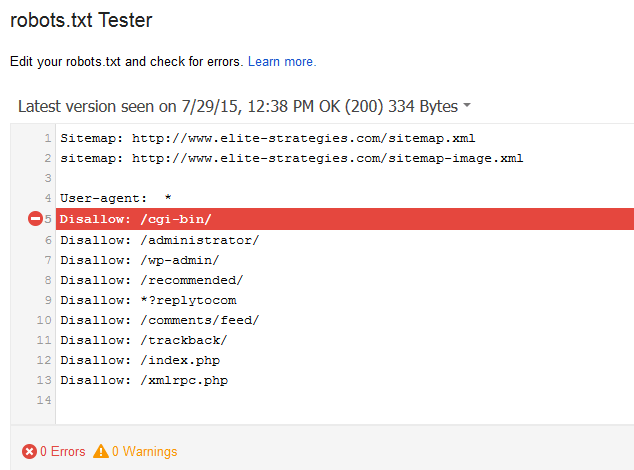
Example: Our robots.txt file
For instance you really don’t want the “admin” area of your website being viewed by most users, so you can tell Google not to crawl it by not allowing it.
Similarly, if you really want to ensure a certain section of your website is being crawled, you can indicate that within the robots.txt file as well.
Most sites have a very limited “crawl budget” i.e. the amount of pages that will be crawled each time Googlebot visits your site. That said, you really want to optimize Googlebot’s time when it visits your site. You don’t want Google wasting its time on irrelevant sections of your website when it could be crawling more important sections.
The robots.txt file for LinkedIn is a great example of a well thought out robots.txt file. Last we checked it had over 1000 lines of entries. On a massive website like this, they really need to consider which parts of the website they want opened for Google to crawl especially since they have over 200,000,000 (200 million) results in Google.
Curve ball: you can disallow a URL within the robots.txt file, but Google still might index that. I’ll rephrase that: just because you tell Google not to allow a URL, doesn’t mean it is going to listen to you.
With that in mind, it isn’t a great idea to count on the robots.txt file to block or unblock pages in the search engines. The robots.txt file is much better suited as a guideline for Googlebot to help it crawl large and important areas of your website.
If you really want a deep understanding of the robots.txt file, Google wrote a very detailed specification on the Google Developers website.
A robots.txt file probably won’t make or break your SEO plan of action, but it will probably help.
AI crawlers and LLM training bots. The newer category of crawlers you may want to think about are AI and LLM bots. If you want to opt your site out of being used to train large language models (or just want to throttle their crawl), you can disallow them in robots.txt. A few of the current user agents: GPTBot (OpenAI), ChatGPT-User and OAI-SearchBot (OpenAI), Google-Extended (Google’s AI/Bard/Gemini training opt-out, separate from Googlebot), ClaudeBot and Claude-Web (Anthropic), PerplexityBot, CCBot (Common Crawl, which in turn feeds several model trainers), and Applebot-Extended (Apple’s AI opt-out, separate from Applebot for Siri/Spotlight). Blocking these does not affect your rankings in Google or Bing search, since the search crawlers are separate user agents.
Robots.txt Examples in for SEO
Robots.txt allowing CSS and JavaScript
Blocking CSS and JavaScript resources in robots.txt breaks how Googlebot renders your pages and is one of the most common ways to tank a site. If your file disallows any /wp-includes/, /wp-content/, or similar paths, open them back up for Googlebot. The simplest rule to prevent it:
This example tells Yahoo’s Slurp bot not to crawl your website (Yahoo’s organic search results are actually powered by Bing these days, but Slurp still crawls for a few of Yahoo’s own products):
This example tells all robots that they can crawl all files on this particular website.
This example tells all robots not to crawl the website at all.
This example tells all robots not to crawl these specific directories
This example tells all robots to not crawl one file in particular
Meta Robots Tag
The meta robots tag is a tag that you can add to the header of your website, to give certain robots such as Googlebot instructions on how to crawl your website. For a quick example, this is how a few of them would look.
While the meta-robots tag probably isn’t a direct ranking factor itself, it can still play a vital role in the overall optimization (SEO) of your website.
There are a number of different parameters that you can use in the meta robots tag, here is a table illustrating some of the more popular ones and the crawlers that recognize them.
| Robots Value | Yahoo / Bing | |
|---|---|---|
| index | Yes | Yes |
| noindex | Yes | Yes |
| nofollow | Yes | Yes |
| none | Yes | Maybe |
| follow | Yes | Maybe |
| noodp | Yes | Yes |
| noarchive | Yes | Yes |
| nosnippet | Yes | No |
For the purpose of this post, we’ll mainly be talking about search engine bots such as Googlebot and Slurp (aka Yahoo.)
Index, Noindex
The meta robots index tag to make sure to index that particular page. Conversely, the noindex tag will tell the crawler not to index the page. The kicker here is that sometimes even if you “noindex” a page it will still be displayed in the search results. If you really don’t want Google to index your website, our advice is to not list it on the open web, or password protect it.
A good example of the noindex parameter would be for pages such as admin or login pages that you don’t want Google to crawl. These pages can not only tax your server resources but can confuse users if they see them in the search results.
Follow, nofollow
The nofollow parameter tells crawlers not to follow links within that page. Conversely the follow tag tells crawlers to explicitly follow links within that page.
Other parameters
Most of the older parameters have fallen out of use. noodp was about the Open Directory Project (DMOZ), which shut down in March 2017, so it is effectively a no-op now. noarchive tells Google not to show a cached copy link alongside your result in the SERPs (it has nothing to do with the Internet Archive’s Wayback Machine, which respects /robots.txt rules separately). nosnippet tells Google not to generate a snippet for the page at all, and Google added max-snippet, max-image-preview, and max-video-preview directives in 2019 for finer-grained control. In September 2022 Google also helped publish RFC 9309, which formalized the robots.txt standard for the first time.
For the most part, most users don’t really need to use the majority of these tags with the exception of noindex and nofollow.
Last updated April 2026