Blogging and SEO
In the past 5 years blogging has gone from an obscure hobby to a mandatory part of every internet marketing and SEO campaign. Blogging is an excellent way to connect with your customers and potential customers. Integrating a blog into a website is something that we consider mandatory. That is the first thing we check on every project our SEO experts take on, since a stale blog is almost always tied to flat rankings. Failure to implement a blog won’t cause any negative effects, but it is definitely a wasted opportunity from an SEO perspective.
Blogging has become such an integral part of SEO that it has spawned an industry in and of itself: content marketing. While we won’t dive too much into that topic today, we do feel as though blogging plays a large role in on-page SEO. We believe that the mere presence of a quality blog on a website can be a positive signal to search engines. What do we mean by a ‘quality blog”:
- relevant and focused posts
- engaging and useful content
- unique content
- content deemed “shareable”
- content that is properly marked up
- frequently written
- multiple authors
For smaller businesses, you can implement a WordPress blog easily by installing it on your server. For most websites, this is as simple as a one-click install on the back-end of your server. Generally it takes about 5 minutes to install WordPress and can be configured and optimized in another few hours.
Back in the early days of the web, sites were very flat. They had a few static pages, maybe a contact form, and not much else. There wasn’t much information that needed to change, so the site rarely did.
Years have passed and websites are now much more dynamic and complex. Search engines are looking for active websites within their results. The operative word here being “active” which could mean a number of different things such as regularly updated content or the presence of a blog
Choosing a Blogging Platform
As an SEO, choosing a blogging platform can almost predict the future success of your campaign’s initiative. Choose an outdated blogging platform and Google might hate you. Choose an up-to-date and intuitive blogging platform and Google will love you.
We rarely make such bold statements when it comes to making recommendations, but if you are shopping around for a blogging platform we highly recommend WordPress. WordPress is free, open source, and great for SEO. Why is WordPress so great for SEO:
- It can be very lightweight
- Categories and tags built in
- Custom permalink structures
- SEO plugins
- Performance Plugins
- Built in commenting systems
- Easy to integrate social media
- So much more

Also please don’t confuse WordPress.com with the hosted blogging platform from WordPress.org. WordPress.com is still a blogging platform but it is an off-site version of it with different features and less flexibility.
Alternatives to WordPress:
- Squarespace
- Ghost
- Webflow
- Substack (newsletter-style)
- Medium
- Drupal
- Joomla
- Wix
- Static-site generators like Hugo, Astro, or Next.js (for more technical teams)
Some of these options such as Drupal and Joomla have been around for a very long time and are open source (free) while others are new to the game and some form of payment involved.
Organize your content
This is one aspect of blogging that a lot of SEO’s don’t talk about. For instance this tutorial we wrote on on-page SEO took us days to organize. We needed to figure out which sections were most important, what to name them, and where to put them within our sites hierarchy.
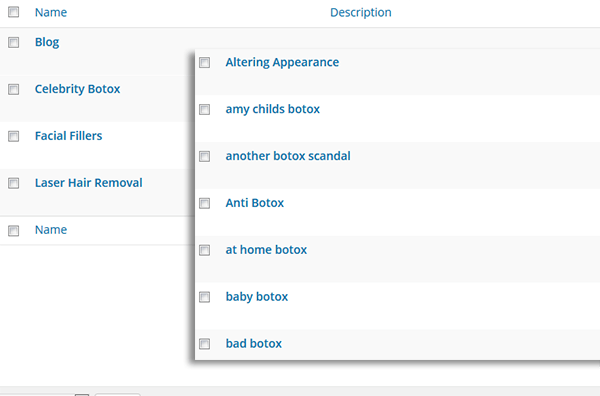
By breaking your content into logical chunks you can really help users find the content they are looking for much easier. This is where categories and tagging comes into play. By accurately tagging and categorizing your content, you not only give your users a logical structure for your website but you help Google identify which sections are the most important. For instance if you have 2 categories, 1 with 100 posts and 1 with 2 posts the one with 100 posts will probably appear more important.
The last thing we will say when it comes to blogging is to “create content for users, not for search engines.” This is a very popular phrase within the SEO community, it is almost a mantra. Google doubled down on it with the Helpful Content System, which launched in 2022 and was folded into the core ranking algorithm in March 2024. It is specifically tuned to demote content that feels written for SEO rather than for a real person. AI-assisted writing is fair game under Google’s current guidelines, but only if the output is helpful, accurate, and demonstrates real experience and expertise (the “E” and “E” in E-E-A-T). Shipping thin, AI-generated filler at scale is the fastest way to get quietly demoted in 2026.
WordPress SEO Tips
Being that WordPress is one of the most popular blogging platforms and is the one that we recommend, we decided to focus a small section to optimizing it. Anytime we are working with a new WordPress website we have a basic workflow that we rinse and repeat each time:
- ensure permalink structure is correct
- delete any stock articles and images
- name any categories and tags to targeted keyword
- install an SEO plugin such as Yoast SEO, Rank Math, or All in One SEO
- install an XML sitemap plugin
- connect social networks via icons and social sharing
- set up a basic theme that is conducive to SEO
- implement rel=canonical tags
There are a number of other recommendations we might make depending on the style and type of blog that it is, but those are the ones we will implement no matter what. For example a blog on an eCommerce site would be set up differently than a beauty blog.
Blogging Topics
When it comes to blogging content, there are a number of different directions you can take. The first question you need to answer is what type of blog are you going to be? For example your blog can be structured as:
- a company newsletter
- how-to style blog posts
- relevant industry news style articles
- whitepapers
- or a combination of the above
Once you’ve decided what type of blog you are going to be, you can start figuring out what you are going to write about.
As for the content itself, our recommendation is to choose topics that are topically relevant and have a high keyword volume. A lot of times we will do a brainstorming session of basic keyword ideas, and create blogging topics based on the keywords with the most volume. For this we will use Google’s Keyword Planner (inside Google Ads, formerly AdWords):
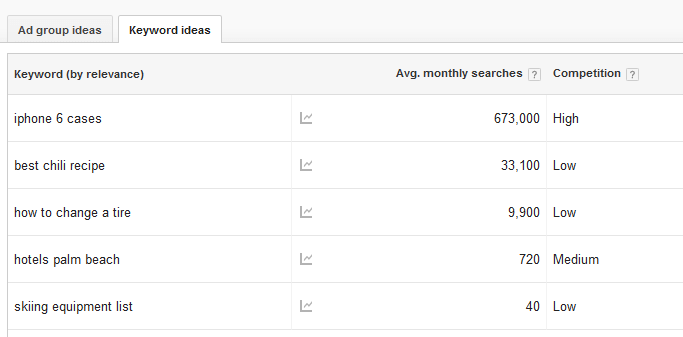
The keyword tool will serve as a basic guideline for blogging topics, and should never be taken literally. The keyword tool also allows you to find keywords to stay away from. Certain topics that aren’t searched very often and have a low competition score might not be the best idea.
On the other hand, you also must consider how your content will look on social media. Just because it might not bring in any traffic from search doesn’t mean it won’t do great on Facebook, LinkedIn, X, or Threads.
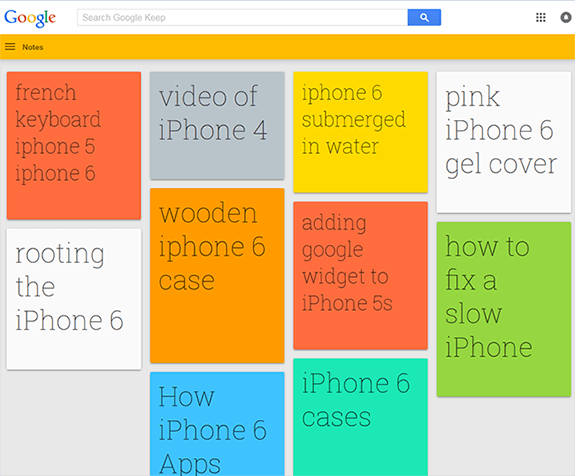
As for new content ideas and how to organize your thoughts, we are a big fan of Google Keep. Google Keep comes in desktop and app form and has a really simple user interface. Every time you get a new blogging idea you just add it to a new “card” and color code it based on category. Once you are ready to blog, you have a whole list of content ideas. This is great for documenting ideas you think of throughout the day:
URLs and Internal Linking
Try to use URLs or permalinks that are helpful to your visitors. There are a few basic guidelines to follow when structuring the permalinks on your website and creating new blog posts. A few examples:
Creating an effective internal linking strategy within your website is just as important as your main website. We’ve already written an entire section on internal linking in our on-page SEO tutorial, you can read more there. With that in mind, there are a few extra tips we recommend for blogs with regard to internal linking:
- follow the same internal linking strategy as you would on your main website
- interlink within posts, pages and other resources
- interlink within your main website and your blog
Last updated April 2026