HTTPS / SSL
When we first wrote this guide, SSL was optional and plenty of sites ran on plain HTTP. That is no longer the case. HTTPS is now the default, and serving a page without it gets you security warnings in every modern browser, tanks your conversions, and sinks you in the search results.
If you want to rank, have HTTPS enabled. It is that simple. We check SSL config on every manual SEO audit we run, since improper HTTPS rollouts are still one of the more common sources of 404s we find.
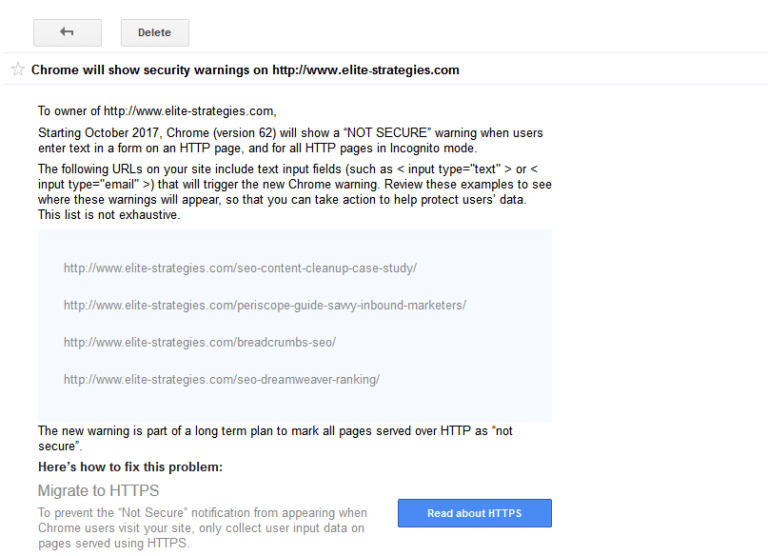
Every major browser now flags HTTP pages with a prominent “Not Secure” warning, especially on pages that collect form data. Google Search Console reports these as security issues, as shown below:
Google confirmed back in 2014 that HTTPS is a ranking signal. They called it “lightweight” at the time, affecting fewer than 1% of queries. That was then. Today HTTPS is not a small ranking bump, it is a prerequisite. Pages served over HTTP in 2026 are effectively invisible in modern search, skipped by many crawlers, and excluded from features like AI Overviews. Even years ago, Google’s Gary Illyes was direct about how much it mattered:
It was a bold statement at the time, and plenty of seasoned SEOs had something to say about it. Google has always been reluctant to confirm specific ranking signals, which made the admission notable. Years later, it has aged well.
Good news, you do not need to buy an SSL certificate anymore. Free certificates from Let’s Encrypt are available through almost every hosting provider and work identically to paid ones in the eyes of Google and browsers. That said, switching a site from HTTP to HTTPS is still a migration. Google treats the HTTPS version as a separate site, so you will need to verify the HTTPS property in Google Search Console and make sure the old URLs redirect cleanly.
Your first step is getting an SSL certificate. For most websites, a free Let’s Encrypt certificate issued through your hosting panel or your CDN (Cloudflare, Fastly, and others issue them automatically) is the simplest path and is treated the same as any paid cert by search engines. If you need paid support or specific compliance handling, GlobalSign, DigiCert, and Sectigo are all solid options. The certificate type matters more than the brand. There are three to know:
- Extended Validation (most thorough, historically tied to the “green bar” in browsers which browsers have since removed)
- Organization Validation (adds company-level verification)
- Domain Validation (basic, free via Let’s Encrypt, the default for most websites)
We really can’t go into how to install an SSL certificate on your website within this guide, because it truly depends on so many factors such as the type of website you have, the server you are running the operating system on your server and so much more.
Also, for those webmasters that have cPanel or WHM you can enable “auto-SSL” which can (like the name implies) automatically enable SSL.
Whatever your situation is, I would put aside a full day to reconfigure your website and make sure to have your network admin handy in case something breaks.
On-Page SEO Considerations and Benefits
We’ve already stated this, but clearly the largest benefit is the fact that Google now considers this a ranking factor. Google has said in the past that there are over 200 ranking factors, some having more power than others.
In addition to the rankings boost you might receive you also might get some referrer data that you weren’t getting before you had your SSL certificate installed. When web traffic passes from an HTTPS > HTTPS website which is becoming more and more popular that referrer data is preserved in your analytics which can provide you with some great data about your visitors that you didn’t have access to before.
All certificate types signal HTTPS to Google equally. For years, EV certificates displayed a “green bar” in browsers that many SEOs pointed to as a trust signal, but Chrome, Firefox, and Safari all removed that visual treatment back in 2019. Today the trust signal is the absence of a browser warning, not an EV-specific indicator. For most sites, a free DV certificate is all you need.
There are a ton of resources that have to be updated when switching to HTTPS. For instance your sitemaps, your robots.txt files, canonical elements and even your analytics tracking code needs to be changed.
Once everything is up and running, use the URL Inspection tool in Google Search Console to confirm Google can crawl and render your HTTPS pages correctly. It replaced the older fetch-and-render tool and shows live rendering plus indexing status.
Common Mistakes and Pitfalls
There are a number of common pitfalls and considerations when installing an SSL certificate. Some of these include:
- working with relative URLs
- installing an SSL on your CDN
- social sharing buttons will lose their “count”
- “moving” your website in Google Search Console
- many webmasters claim HTTPS slows down their website
As time goes on and we learn more about how HTTPS plays a role in SEO. Before you go installing an SSL certificate on your website, re-read this article and do as much research if you can.
Pay special attention if you are an SEO that manages a very large and old website with lots of pages. The more complicated and dynamic your website is, the more factors that come into play when configuring an SSL certificate on your website.
Installing an SSL certificate might only take 30 minutes, but configuring it for SEO could take hours or even days. Mis-configure your SSL and you could be in a world of hurt from an SEO perspective. Configure it properly and you could experience some very nice rewards on your website.
Also it is helpful to “force” SSL on all pages, that way if someone lands on a non-SSL page they’ll get properly redirected. I like to use this snippet:
SEO Benefits of SSL
There is a real argument that HTTPS can speed up your website rather than slow it down. Modern protocols like HTTP/2 and HTTP/3 only operate over HTTPS. If your server and CDN support them, enabling HTTPS unlocks multiplexing, header compression, and faster connection handshakes that plain HTTP cannot match.
If you want to see the speed difference in practice, check out the http vs https comparison site. The gap has only widened with HTTP/3 adoption.
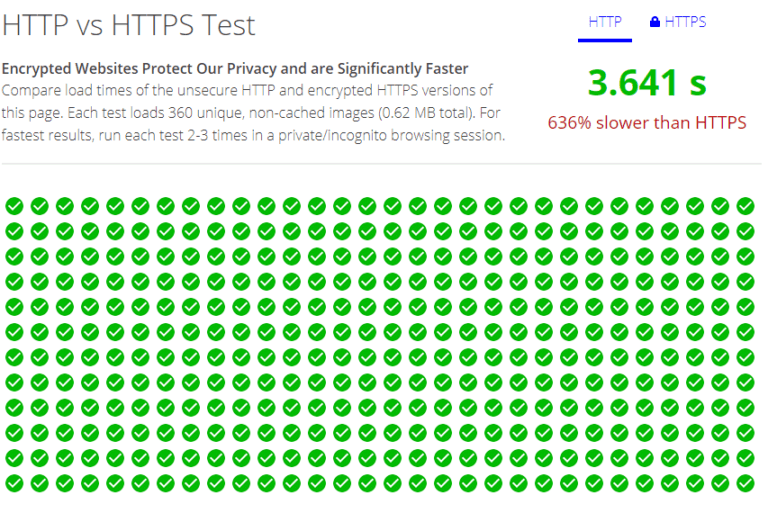
So we know HTTPS is a ranking signal, and we know that site speed is a ranking signal , and if enabling HTTPS can lead to speed increases (sometimes) then this can be a double win!
Lastly
Just remember, improper implementation of SSL can lead to some harsh consequences for you site including:
- 404s
- other server errors
- slow site speed
- browser errors
- other factors
So if you are going to do it, do it right.
Last updated April 2026